
Veo Flow Automation
Batch-generate Veo videos and Nano Banana images on Google F
About Veo Flow Automation
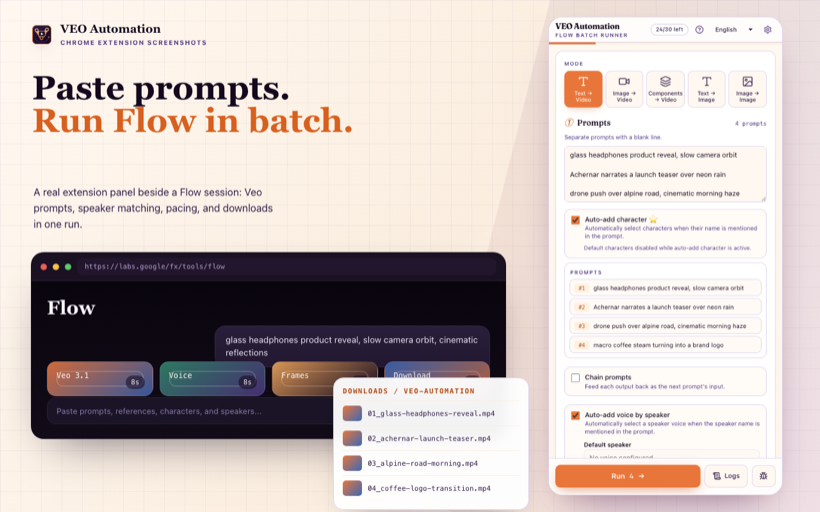
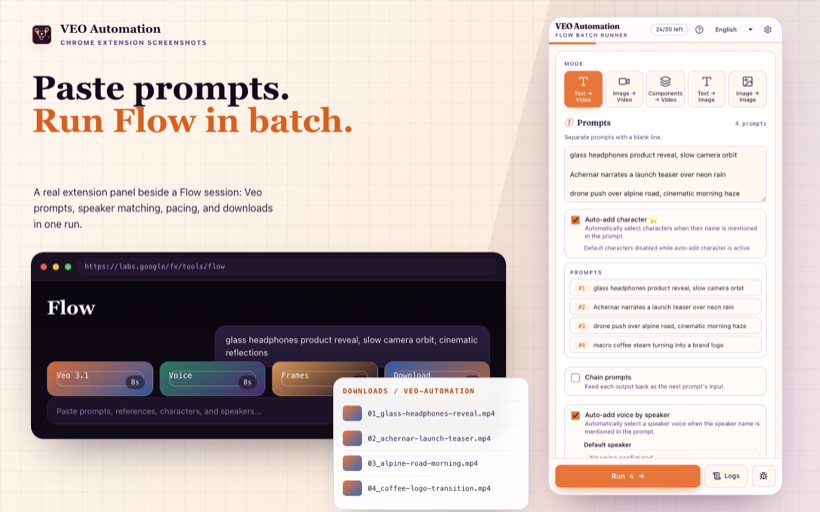
Veo Flow Automation is an independent Chrome extension that turns Google Flow into a hands-free batch generation engine for AI videos and images. Instead of clicking through prompts one at a time, you paste a list of prompts and the extension takes over: it creates projects, sets your options, enters each prompt, waits for the results to finish rendering, and automatically downloads everything with clean, consistent file names. What would normally be hours of manual clicking becomes a single paste-and-walk-away workflow. The extension supports all five generation modes available on Google Flow: Text to Video, Frame to Video, Components to Video, Text to Image for Nano Banana, and Image to Image for Nano Banana. A dedicated chain mode lets you produce sequential clips that flow naturally from one to the next, making it ideal for longer narrative sequences and continuous shots. You also get per-prompt voice and speaker control, character library loading for consistent characters across generations, and full control over the model, aspect ratio, and clip length. A built-in batch queue engine keeps long runs stable with automatic retries and sensible pacing, while live progress indicators and detailed logs let you watch the queue and step in whenever you need to. Everything runs locally in your browser. Veo Flow Automation was built for YouTubers, short-video creators, marketing teams running creative variants, and indie developers who need real batch throughput from Google Flow. It is an independent product and is not affiliated with, endorsed by, or sponsored by Google; Google Flow, Veo, and Nano Banana belong to their respective owners.
No reviews yet — be the first!
Discussion
Join the conversation
Sign in or create a free account to leave a comment.
Analytics
Unique visitor trends for Veo Flow Automation
No comments yet. Be the first to share your thoughts!